
To protect you further JN Bank will be implementing two-factor authentication to access your JN Bank LIVE account. Two-factor authentication, also known as 2FA, is a security feature that provides you with more than one way to log into an application or online platform, or to conduct certain activities via the application or platform. In simple terms, it’s an added layer of security to protect you.
JN Live Online Banking Two-factor Authentication FAQs
Will logging into my account be the same?
No, users will be required to do 2FA using the Google Authenticator app.
What is the Google Authenticator app?
It is an independent application that adds an extra layer of security to your online accounts through a second step of verification when you sign in.
This means that in addition to your password, you’ll also need to enter a code that is generated by the Google Authenticator app on your mobile phone.
With the implementation of 2FA, how will I be able to log into my JN Bank LIVE account for the first time?
Logging into your JN Bank LIVE account will be different. You will be required to set up the Google Authenticator application.
Step 1: Go to the Google Play Store or App store and download the Google Authenticator App on your mobile phone.
Step 2: Proceed to log in to your JN Live Account and enter your username and password as usual.
Step 3: Enter the last four digits of your mobile number (on JN Bank’s record)
Step 4: Enter OTP received on your mobile phone.
Step 5: Scan the barcode on the google authenticator setup screen to register your JN LIVE profile.
Step 6: Enter the Confirmation Code in the Google Authenticator app.
Will I need to follow all these steps each time to login?
No, you will not. After setting up Google Authenticator, on your next login, you’ll only required to do the following:
A.a. Enter your username and password and the user verification screen will be displayed.
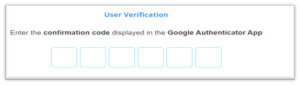
B.Launch the Google Authenticator app, retrieve the code generated and enter in the user verification screen.
What is an OTP?
One-time passcodes (OTP) are automatically generated codes, made up of numbers only or numbers and letters, which you are required to enter each time you do certain transactions online. Your code expires after a few minutes, so if the transaction has not been completed, another code will need to be generated.
How will I receive my OTP when I need to do a login and process transactions?
The OTP will be received via the google authenticator application.
What is a trusted device?
A trusted device is a mobile phone, laptop, iPad, tablet that you’ve already signed into using two-factor authentication. It is a device that you consider to be safe and within your possession. We do not recommend adding shared or public devices to your trusted devices list.
What is the benefit of a trusted device?
It removes the need for the user to retrieve the verification code from the Google Authenticator app and enter it on the verification screen when setting up bill payments, saved transfers and saved bill payments, while improving the user experience.
Can I have more than one trusted device?
Yes, you are allowed to save multiple trusted devices.
Do I still need my transaction password?
No. We have removed security questions and images from the login process.
Will I need to use two-factor authentication for all transactions?
No, you will not. 2FA will only be required when you do any of the following:
- When you log into JN LIVE.
- When adding transfer recipients.
- When transferring funds to other JN Bank accounts, local bank transfers, wire transfers
- Phone top up
- Setup new bill payments
2FA will not be required for transfers “Within my JN accounts” and for saved transfers/bill payments on trusted devices.
What if I enter an incorrect code?
You have up to 3 attempts to enter the correct code, after which the user will be locked. You will be required to either use the self-unlock feature or you can contact our Member Care Centre at the numbers below for assistance:
- Jamaica: 888-991-4065/6
- United Kingdom: 0-800-328-0387
- USA & Canada: 1-800-462-9003
Do I need a transaction password for transfers and bill payment?
No, you will be required to use an OTP/ code received through the Google Authenticator app.
What has changed with Transfers?
Users will now be required to execute a transfer from the “create transfer” tab and by selecting, a new transfer or saved transfer option.
What has changed with the Bill payment feature?
Users will now be required to make a payment using the ‘New’ or ‘Saved Payment’ feature.
How will I receive my code when I need to do a transaction?
You will receive your confirmation code in the Google Authenticator app on your cell phone.
What if I lose my phone and got a new one and new number?
You will need to visit the branch to update the phone number on record.
After enabling the Google Authenticator app, will it now be linked to my JN Bank LIVE profile?
Yes, it will be.
If my JN Bank LIVE Personal profile is disabled, will I have to go through the entire verification process again?
Yes, you will have to redo the full verification process and rescan the barcode using the Google Authenticator app
If my JN Bank LIVE profile is disabled and a new profile has been created will I be able to access codes using the old JN Bank LIVE profile configured in the Google Authenticator app?
No, the old JN Bank LIVE profile linked to the Google Authenticator app will need to be removed. The Google Authenticator bar code will have to be rescanned and the new JN Bank LIVE profile linked.
Will the Google Authenticator app capture any information from my JN Bank LIVE profile?
No, the Google Authenticator app will not capture or store any of your banking information.
If I do not have data on my mobile device, will I be able to retrieve codes from the Google Authenticator app?
Yes, the app will generate tokens without data after it has been downloaded.
If I do not have a Gmail account, will I be able to access the Google Authenticator app as a guest?
Yes, you will be able to receive codes as a guest.
Will I be able to download the Google Authenticator app on my laptop?
You will only be able to download the Google Authenticator app on your mobile phone or tablet. You will not be able use your laptop to retrieve codes to facilitate login or transactions processing.