
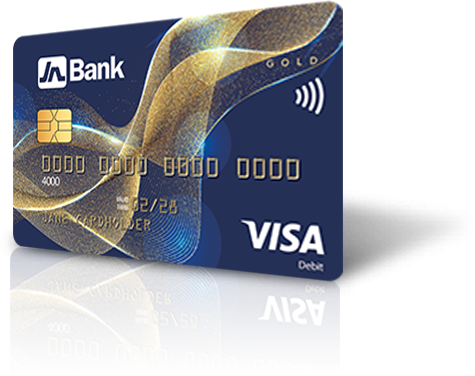
Tap, Pay, and Go with Your Upgraded JN Bank Visa Debit Card
Experience more control, more convenience, and even more peace of mind with every transaction using your JN Bank Visa debit card!
Schedule an Appointment
Your New JN Bank Visa Debit Card is Ready — Here’s How to Get It
Update your personal mobile number and email address by visiting your nearest JN Bank branch or call the JN Member Care Centre at 888-991-4065/4066.
It’s also best to set up a transactional account for your debit card. You will only receive one debit card to which we strongly encourage you to link only a transactional account to protect your primary savings.
Get started! Download the JN MyCard App



Activate Your Card in a Few Simple Steps
To activate and set your PIN, simply download the JN MYCard app available in the iOS App Store and the Google Play Store and follow the instructions. It’s quick, easy, and gives you even more control over your card.
With the app, you can:
- Register and activate your card
- Set or change your card PIN
- Block or unblock your card anytime
- Turn on/off online purchasing
Get started today and take full control of your card experience right from your phone.
Have an issue with your JN Visa Debit Card?
If something doesn’t look right or you need to report a problem, we’re here to help.
Click below to learn how to submit a complaint and the steps involved.
Click here to get started.

Shop Online & Control Purchases
Make online purchases globally

Tap and Go Technology
Chip technology to tap and pay
for added security

Mange Card Payments
Enable of disable top-to-pay
feature if lost/stolen
Important Documents and Forms


Frequently Asked Questions
How do I get a JN Bank Visa debit card?
JN Bank Visa debit cards are now being distributed on a phased basis. If you received an email indicating that your card is ready for collection you should take the following steps:
- Set up an appointment to collect your card at your preferred branch. To set your appointment, visit https://www.jnbank.com/appointment-location/.
- Update your personal mobile number and personal email address using the ONE JN Passport before you collect. Without your email address or phone number, you will be unable to receive notifications when your card is used.
- Set up an Everyday Transactional Account. You will only receive one debit card to which we strongly encourage you to link your Everyday Transactional Account to protect your primary savings.
I missed the appointment to collect my card. What should I do?
If you missed your appointment, you may set another one by clicking the button below or typing jnbank.com/appointment-location/ into your browser, so that your visit will be fast and smooth.
After collecting your card, check your card package for instructions on how to activate, secure, and manage your new JN Bank Visa debit card.
I now have my JN Bank Visa debit card. How do I activate it?
We’re so happy that you’ve received your brand new JN Bank Visa debit card. To PIN and activate your card, you will need to use our JN MYCard app, which you can download from the app stores for both Apple and Android devices.
What will happen to my current JN Bank 24/7 debit card?
Your current JN Bank 24/7 debit card will eventually be deactivated and be replaced by your new JN Bank Visa debit card.
Is it also available via a website?
Great question! We understand that not everyone has space on their devices to install the app, so there is a web version for easy access, which you may access at https://card-manager.jnbank.com/welcome.
Why am I being encouraged to set up an Everyday Transactional Account and only attach that account to my card?
To protect your savings, it’s best to limit access to it by establishing an Everyday Transactional Account where you only keep the money you need to spend. You can transfer conveniently what you need from your primary savings account to that account by using your JN Bank LIVE app or using the JN Bank LIVE website.
Is the ONE JN Passport app available in both app stores?
Yes, you can download ONE JN Passport from Google Play Store for Android device users or the App Store for iOS phone users.
How do I use the JN MYCard app to PIN my card?
Once you have completed the registration of the JN MYCard app, you will be directed to register your new JN Bank Visa debit card and create the PIN for your card. Follow the on-screen instructions to complete the process. You can access step-by-step instructions to PIN your card on jnbank.com.
Can I change my PIN at any time in the app?
Yes, you can change your PIN at any time. Simply go to your JN MYCard app, select ‘CHANGE PIN’ and follow the instructions.
Can I use the JN MYCard app to also block and unblock my card?
Yes, you can. One of the app’s most convenient features is the ability to instantly block or unblock your card. Simply open the app and you’ll see clear options to manage your card’s status right from the main screen.
If I block my card, will it stop all types of transactions?
This is another great feature of the app. You choose what type of transactions you want to block. You can block and unblock:
- All transactions
- Online transactions only
- Tap transactions only
Why can I only receive one JN Bank Visa debit card?
At this stage of our rollout, each member will receive one Visa Debit Card as part of Phase One. The option to request additional cards may be considered in the future.
Can I set up an account without visiting a JN Bank branch?
Yes, you can set up an account conveniently in the ONE JN Passport app.
What should I do if there is a transaction done with my card that I am certain I did not do?
We urge you to please contact JN Bank immediately by calling 888-991-4065 or 888-991-4066 24 hours every day, including public holidays and weekends.